AI Tools Subscription in Saudi Arabia and the UAE: Gulf Buyer's Guide
How an AI tools subscription in Saudi Arabia and the UAE works on ZTOOLZ: prices in your currency, card, Apple Pay or crypto, activation and how tools open.
Getting an AI tools subscription in Saudi Arabia and the UAE through ZTOOLZ comes down to three things: prices appear in your own currency, you pay with a Visa or Mastercard card, Apple Pay or crypto, and the subscription usually activates automatically after a successful card payment. This guide covers the details that trip people up, such as cards blocked for online purchases, mada cards and how many devices you can use.
The steps are the same for readers in Kuwait, Qatar, Bahrain and Oman.
What do you actually get with a ZTOOLZ subscription?
ZTOOLZ sells shared access to premium AI, design, video, stock-media and learning tools. The tools run on accounts owned by the platform, and you use them through ZTOOLZ instead of opening a separate personal account with each company. That is why one subscription can cover a writing assistant, a design editor and a video editor together.
A typical Gulf customer might use ChatGPT to draft emails and reports in Arabic and English, Canva Pro for social posts and presentations, and CapCut Pro to edit short vertical videos. You can buy only what you need, or combine several tools.
Because the accounts are shared, a few habits matter. Do not change account settings, passwords or profile details, and do not save personal data, card details or private files inside a shared tool. Our guide to security habits for shared platform accounts explains this in more detail.
Which currency will you see, and what appears on your bank statement?
Prices on ztoolz.io are shown automatically in your local currency, based on the country you visit from: Saudi riyal (SAR), UAE dirham (AED), Kuwaiti dinar (KWD), Qatari riyal (QAR), Bahraini dinar (BHD) or Omani rial (OMR). If you want a different currency, for example because you live in Abu Dhabi but plan your budget in riyals, use the currency switcher in the store.
Card payments are processed in US dollars. Your bank statement may therefore show the dollar amount, converted by your bank into your currency. Gulf currencies are pegged to the US dollar (the Kuwaiti dinar follows a basket of currencies rather than the dollar alone), so the amount you pay stays steady from one month to the next. Your bank's own terms for foreign-currency card payments still apply, so check them in your banking app if you are unsure.
We do not list prices in articles because they can change. For the current price in your currency, open the tool page, for example the ChatGPT page, or browse the store.
How do you pay for an AI tools subscription in Saudi Arabia and the UAE?
There are three ways to pay on ZTOOLZ from the Gulf:
- Visa or Mastercard, debit or credit, on a secure card checkout page.
- Apple Pay, offered on the same card checkout page when you use an iPhone, an iPad, or a Mac with Safari.
- Crypto, if you prefer to pay that way.
A processing fee may apply to card payments. If it does, it is shown on the checkout page before you pay, so you see the final amount first.
Does a mada card work?
Most bank cards in Saudi Arabia carry the mada logo. A mada card works only if it also carries a Visa or Mastercard logo, and in that case it is used as a Visa or Mastercard card. A card that carries the mada logo only is not accepted. Look at your card: if you see Visa or Mastercard next to mada, you can use it.
What about KNET and Benefit?
KNET in Kuwait and Benefit in Bahrain are not available on ZTOOLZ. Customers in Kuwait City or Manama can pay with a Visa or Mastercard card, Apple Pay or crypto instead.
Why was your card declined, and how do you fix it?
The most common reason a Gulf card is declined has nothing to do with your balance. It is a security setting. Many banks in the region issue debit cards with international or online purchases switched off, and because ZTOOLZ processes card payments in US dollars, your bank treats the payment as an international online purchase.
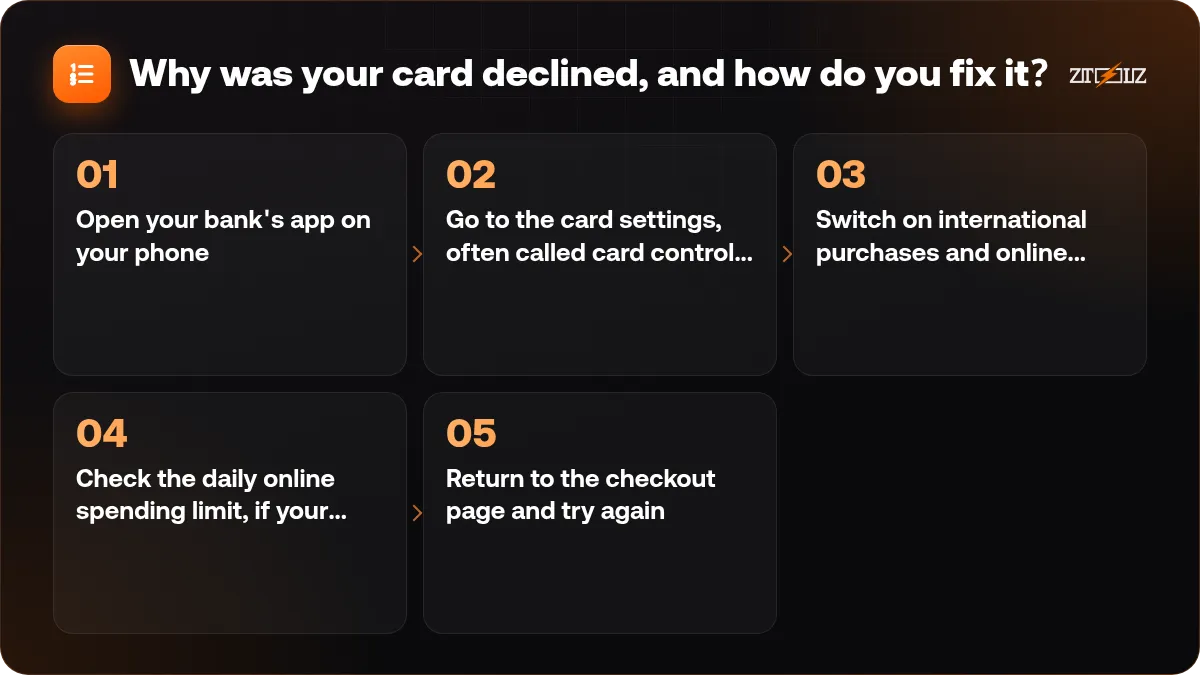
- Open your bank's app on your phone.
- Go to the card settings, often called card controls or card management.
- Switch on international purchases and online purchases (the exact names differ between banks).
- Check the daily online spending limit, if your bank sets one.
- Return to the checkout page and try again.
Still declined after switching it on? Try another Visa or Mastercard card, or call your bank and ask whether it stopped the payment. If the bank says the payment went through but you see no subscription, contact ZTOOLZ support with the time and amount of the payment.
What happens after you pay?
After a successful card payment, the subscription is usually activated automatically. You will find it in your account under My subscriptions, together with the tools you bought and the way to open each one.
If you do not see it after a little while, refresh the page and make sure you are logged in with the email you used at checkout. If it is still missing, contact support on WhatsApp or live chat on the site, or through the contact page, and include your order details so the team can check it quickly.
How do the tools open on your devices?
Depending on the tool, ZTOOLZ gives you one or more ways to open it:
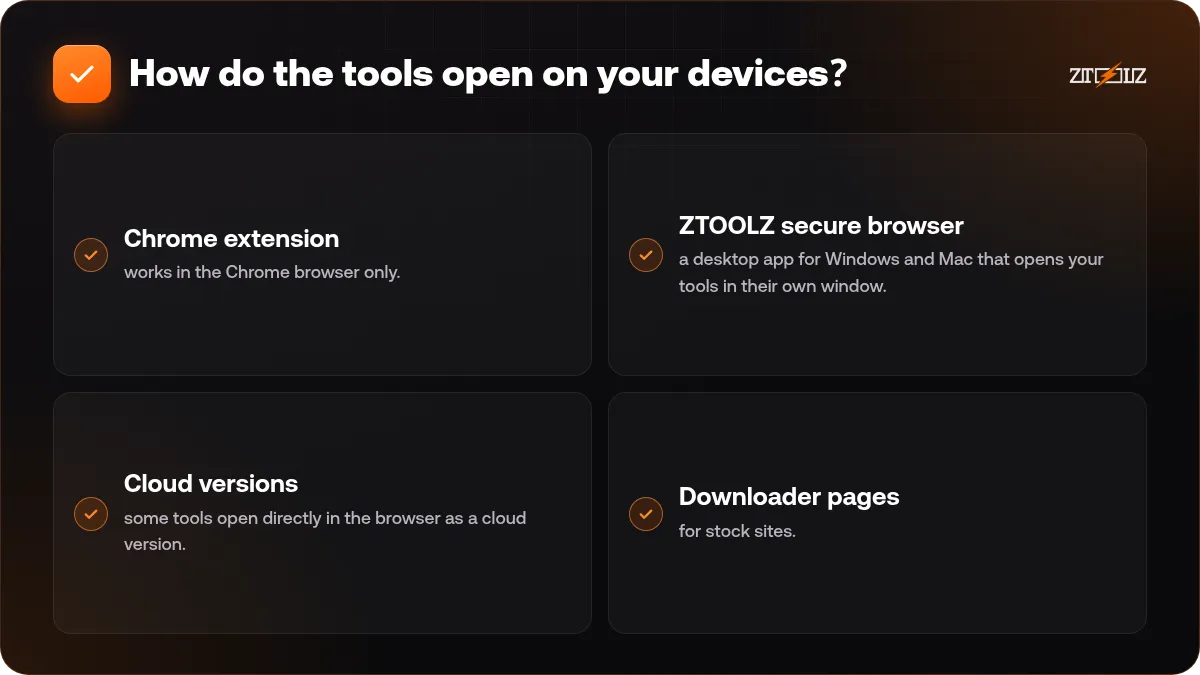
- Chrome extension: works in the Chrome browser only.
- ZTOOLZ secure browser: a desktop app for Windows and Mac that opens your tools in their own window.
- Cloud versions: some tools open directly in the browser as a cloud version.
- Downloader pages: for stock sites. You paste the link of a stock file and download it. Files come through the platform's subscription, so check the licence terms of each file for your project.
If you are not sure whether the extension or the desktop app suits you better, read ZTOOLZ secure browser vs Chrome extension.
How many devices can you use?
Each plan limits how many devices can be used at the same time. If you work on an office laptop during the day and a home computer in the evening, count both. The All In One tiers differ mainly by this number, so choose the tier that matches how you really work.
One tool, a custom plan or All In One?
ZTOOLZ offers three ways to buy, each available monthly or yearly:
- One tool: the simplest choice when you need a single thing, such as an AI writing assistant.
- Custom plan: in the store, press the + button on each tool you want, and they are combined into one subscription.
- All In One: every tool on the platform, available on the pricing page, with tiers that differ by the number of devices.
Here is how that might look in practice:
- A university student in Riyadh who mainly writes reports and summaries may find ChatGPT alone is enough.
- A social media freelancer in Dubai might build a custom plan with Canva Pro, CapCut Pro and ChatGPT to cover design, video and captions.
- A small agency in Kuwait City with several designers and editors will usually get more from All In One, on a tier that allows enough devices.
Monthly is good for testing a tool on a real project, yearly for steady use. For more, see how to choose a tool subscription plan.
A five-minute checklist before you buy
- Check the price in your currency on the tool page or in the store.
- Make sure your card shows a Visa or Mastercard logo.
- Switch on online and international purchases in your banking app.
- Decide how you will open the tools: Chrome extension, secure browser or cloud.
- Count the devices you will use at the same time.
- Choose monthly or yearly.
- Plan to keep personal data and client files out of shared accounts.
How do you get help?
Support is available on WhatsApp and live chat on the site, and through the contact page. You will get a faster answer if you include your order number, the email on your account, the tool name and a screenshot of any error message.
Ready to start? ZTOOLZ gives you shared access to premium tools such as ChatGPT, Canva Pro and CapCut Pro through platform-owned accounts, opened with the Chrome extension, the secure browser, a cloud version or a downloader page. Prices appear in your local currency. Pick the tools you need with the + button in the store to build a custom plan, or see the All In One tiers on the pricing page.
FAQ
Can I pay with a mada card in Saudi Arabia?
Only if the card also carries a Visa or Mastercard logo, in which case it is used as that card. A mada-only card is not accepted.
Will I be charged in riyals, dirhams or dollars?
Prices are shown in your local currency, but card payments are processed in US dollars. Your bank converts the amount, and because Gulf currencies are tied to the dollar, the figure on your statement stays steady.
Can I pay with KNET or Benefit?
No. KNET and Benefit are not available. You can use a Visa or Mastercard card, Apple Pay on Apple devices, or crypto.
Why does my bank decline the payment?
Usually because online or international purchases are switched off on the card. Turn them on in your banking app, check your online limit and try again. If it still fails, ask your bank or contact ZTOOLZ support.
Do I get a personal account with each tool?
No. ZTOOLZ provides shared access through accounts owned by the platform. You open the tools through the extension, secure browser, cloud version or downloader page, and you should not change account settings or store personal data in them.
How do I know my subscription is active?
After a successful card payment it usually activates automatically and appears under My subscriptions in your account. If it does not appear, contact support on WhatsApp, live chat or the contact page.