Freelancer Tools in Saudi Arabia and the UAE: A Practical Toolkit
Freelancer tools in Saudi Arabia and the UAE for designers, editors, writers and marketers: which tool fits each task, a brief-to-delivery workflow and file habits.
The right freelancer tools in Saudi Arabia and the UAE are the ones that let you deliver polished work in Arabic and English without paying for a dozen apps. For most designers, video editors, writers and marketers, a small kit covers almost everything: a design editor, a stock and template library, a video editor, an AI writing assistant and an English proofreader. The rest is workflow: a clear brief, tidy files and on-time delivery.
First, sort out your freelance status
Before you chase clients in Riyadh, Jeddah, Dubai or Abu Dhabi, make sure your freelance status is in order. Saudi Arabia has an official freelance document system for individuals, and the UAE offers freelance permits and licences through several authorities, including free zones. The rules, eligible activities and fees can change, so check the official government source in your country for the current requirements.
This article is about tools and workflow, not legal advice. If you are unsure which route suits you, ask the relevant authority directly.
Which freelancer tools in Saudi Arabia and the UAE cover which task?
Think of tools by the job they do, not by brand. Here is a practical kit by role:
Designers
- Canva Pro: social posts, presentations, simple brand kits and quick resizing for every platform. Good for clients who want fast, consistent content.
- Envato Elements: templates, fonts, mockups, graphics and presentation designs, useful when a project needs a head start or a professional mockup.
Video editors
- CapCut Pro: vertical videos for Snapchat, TikTok and Instagram Reels, captions, transitions and quick edits.
- Envato Elements: stock footage, music and motion templates to lift a simple edit.
Writers and translators
- ChatGPT: outlines, first drafts, headline options, summaries of long briefs and bilingual idea generation.
- Grammarly Pro: grammar, clarity and tone checks for English copy.
Marketers
Marketers usually need a bit of everything: Canva Pro for creatives, CapCut Pro for short ads, ChatGPT for captions and ad variations, Grammarly Pro for English emails and landing pages. Start with the two tools you will use every week, then add others as projects demand them.
How do you build a portfolio that wins Gulf clients?
Clients in the region often hire on trust and referrals, so your portfolio has to show quickly that you understand their market.
- Show 6 to 10 strong pieces, not 40 average ones. Quality beats volume.
- Include bilingual work. A design with a clean Arabic headline next to an English one shows a skill many clients struggle to find.
- Pick a niche or two. Real estate, restaurants and cafes, online stores and events are common needs across Gulf cities.
- Write short case studies: the problem, what you did, the result. Use numbers only if they are real and the client agrees.
- Mark concept work clearly. Self-initiated projects are fine if you label them as concepts.
- Ask permission before showing client work, especially for unreleased campaigns.
If you are a designer starting from zero, our guide to starting freelance graphic design walks through the first steps.
How do you deliver client-ready work in Arabic and English?
Bilingual deliverables are where many freelancers lose points. A short checklist helps:
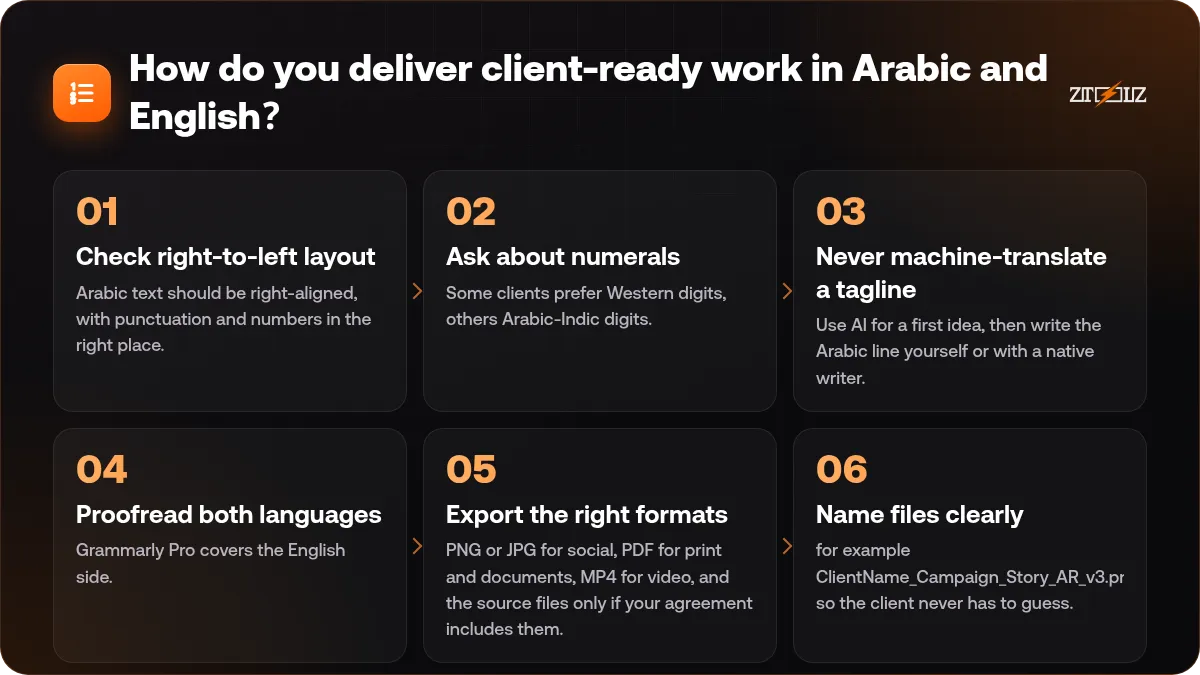
- Check right-to-left layout. Arabic text should be right-aligned, with punctuation and numbers in the right place.
- Ask about numerals. Some clients prefer Western digits, others Arabic-Indic digits. Ask once and stay consistent.
- Never machine-translate a tagline. Use AI for a first idea, then write the Arabic line yourself or with a native writer.
- Proofread both languages. Grammarly Pro covers the English side. For Arabic, read it aloud and have a second reader check important copy.
- Export the right formats: PNG or JPG for social, PDF for print and documents, MP4 for video, and the source files only if your agreement includes them.
- Name files clearly, for example ClientName_Campaign_Story_AR_v3.png, so the client never has to guess.
A workflow from brief to delivery
A repeatable process makes you look professional and protects your time.
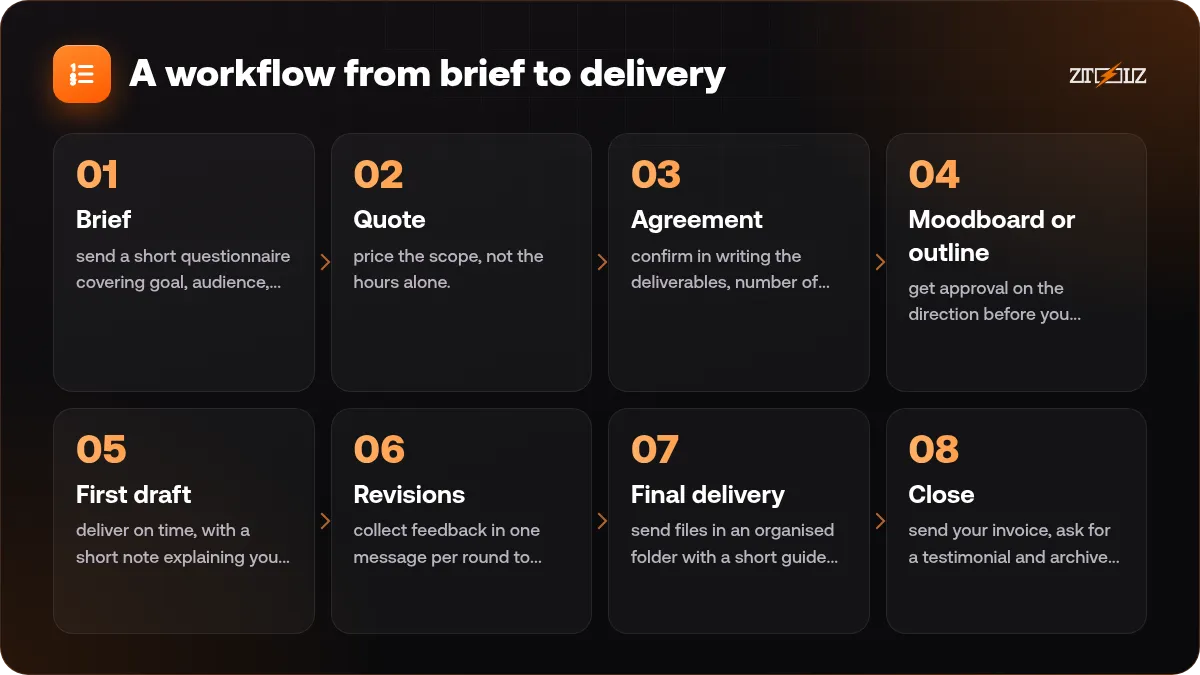
- Brief: send a short questionnaire covering goal, audience, languages, formats, deadline and references.
- Quote: price the scope, not the hours alone. Our article on how to price design services has a simple method.
- Agreement: confirm in writing the deliverables, number of revision rounds, deadline and what happens if the scope grows.
- Moodboard or outline: get approval on the direction before you design or write in detail.
- First draft: deliver on time, with a short note explaining your choices.
- Revisions: collect feedback in one message per round to avoid endless small changes.
- Final delivery: send files in an organised folder with a short guide on which file to use where.
- Close: send your invoice, ask for a testimonial and archive the project.
Keeping your files organised
Good file habits save hours and protect you if a client asks for an old file months later.
- Use one folder per client, then one per project, with subfolders such as brief, assets, working and final.
- Save versions instead of overwriting: v1, v2, v3.
- Keep a simple text file per project listing the stock files, fonts and music you used, with where they came from.
- Back up your working files to your own drive or cloud storage.
- Keep client files private. If you work with tools through a shared account, do not upload confidential client material there or leave personal data in it, and keep your master files on your own storage.
For stock assets in client work, check the licence terms of each file for the project you are using it in. Our explainer on stock asset licences covers the basics.
Why does a custom plan often beat many separate subscriptions?
Freelance income goes up and down. Paying for five separate subscriptions every month, even in quiet months, eats into your margin. A combined approach has clear advantages:
- One bill instead of several renewal dates to track.
- Pick only what you use: a designer might choose Canva Pro and Envato Elements, a video editor CapCut Pro and Envato Elements.
- Adjust as work changes: add a tool for a big project, drop it when the project ends.
To be fair, there are cases where an individual subscription makes more sense, for example when you need your own account for team features or long-term brand storage. Our comparison of shared vs individual tool subscriptions helps you decide.
Build your freelance kit with ZTOOLZ. ZTOOLZ gives you shared access to Canva Pro, Envato Elements, CapCut Pro, ChatGPT and Grammarly Pro through accounts owned by the platform, opened with the Chrome extension, the secure browser or a cloud version. Use the + button in the store to put the tools you need into one custom plan, or see the All In One tiers on the pricing page. Prices appear in your local currency.
FAQ
Do I need a permit to freelance in Saudi Arabia or the UAE?
Both countries have official routes for freelancers, such as the Saudi freelance document and UAE freelance permits. Requirements change, so check the official government source in your country.
Which tools should a beginner freelance designer start with?
Canva Pro for everyday designs and Envato Elements for templates, fonts and mockups cover most beginner projects. Add an AI assistant like ChatGPT for briefs and captions when you need it.
Can I use stock files in client projects?
Check the licence terms of each file for the specific project. Keep a record of which files you used in each job so you can answer client questions later.
Should I share my working Canva link with clients?
If you work through a shared account, deliver exported files (PNG, JPG, PDF or MP4) instead of edit links. That keeps the shared account private and gives the client clean final files.
How do I keep Arabic and English versions consistent?
Write a short copy sheet with both versions side by side, get it approved first, then design. This avoids mismatched messages between the two languages.